What Makes a Good Google Business Profile?
Learn what makes a Google Business Profile useful, trustworthy, and more likely to turn local searches into customer calls.
A Google Business Profile has one job: help the right customer choose your business when they are already searching.
That customer might be comparing roofers after a storm, looking for a plumber during a leak, checking dentists near their office, or deciding which med spa looks trustworthy enough to call. They are not reading your profile for fun. They are trying to decide whether you are real, relevant, nearby, and worth their time.
A good profile answers that question quickly.
The mistake is treating the profile like a listing. Name, phone number, hours, done. That may be enough to exist on Google, but it is not enough to win the customer when three competitors are sitting beside you with better photos, stronger reviews, clearer services, and fewer reasons to doubt them.
Google says local rankings are based on relevance, distance, and prominence. In plain English, Google is trying to understand what you do, where you matter, and whether your business looks trusted enough to show. That is the same thing customers are trying to figure out before they call.
Source: https://support.google.com/business/answer/7091?hl=en
Quick insights
- A good Google Business Profile makes the business obvious: category, services, location, hours, website, and contact information.
- Reviews matter because they help customers trust you, and Google says more reviews and positive ratings can help local ranking.
- Photos are not decoration. They prove the business is active, real, and worth considering.
- The website still matters because many customers click before they call.
- Most weak profiles do not fail because of one major problem. They fail because too many small details create doubt.
Start with the category
The category is one of the first clues Google uses to understand the business.
If the category is wrong or too broad, everything else has to work harder. A roofer listed like a general contractor has made the search engine guess. A med spa with vague services has made the customer guess. A plumber with missing emergency services may not look relevant when someone needs help fast.
The main category should match the primary business, not the most impressive sounding version of the business. The services should match what customers actually search for and what the business actually provides.
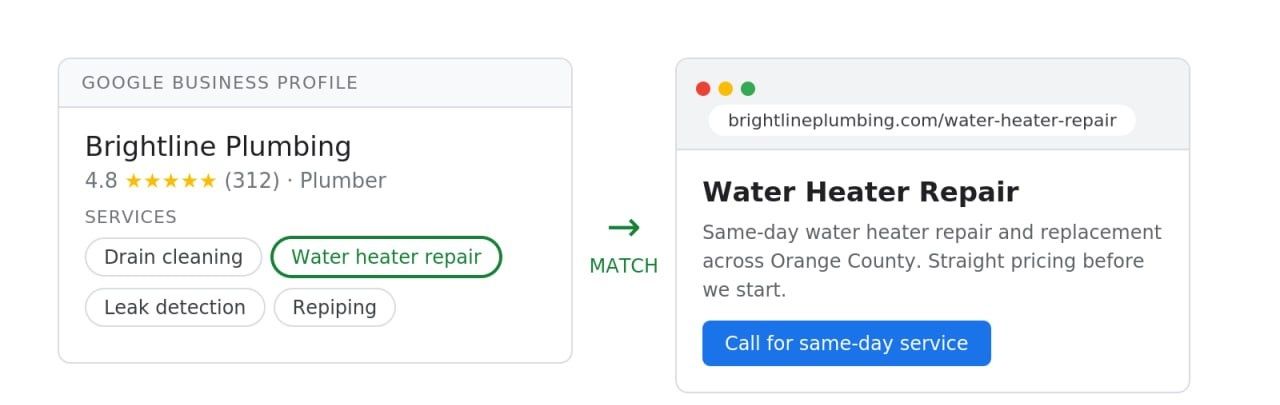
A useful check is simple: if someone looked at only your category and services, would they know what you do?
If the answer is no, fix that before worrying about advanced SEO.
Make the basic information boringly correct
The most important profile details are not exciting. They are also the details customers rely on when they are close to making a decision.
Check these first:
- business name
- phone number
- website
- hours
- address or service area
- primary category
- services
- business description
- photos
The goal is not to make these fields clever. The goal is to remove friction.
A wrong phone number wastes the customer’s time. Old hours create hesitation. A broken website link makes the business look neglected. A service area that does not match reality creates confusion. Confusion rarely turns into a call.
This is where Chase-style SEO works well: answer the practical questions in the order a reader needs them. Do not make the customer hunt for basic information.
Show proof before the customer asks for it
A strong Google Business Profile does more than state facts. It gives proof.
Reviews are the obvious example. Google says more reviews and positive ratings can help local ranking, but the customer reason is even simpler: people trust other customers more than they trust business copy.
A review that says, “They fixed our leaking water heater the same day” does more work than a sentence that says, “We provide fast plumbing services.” One is proof. The other is a claim.
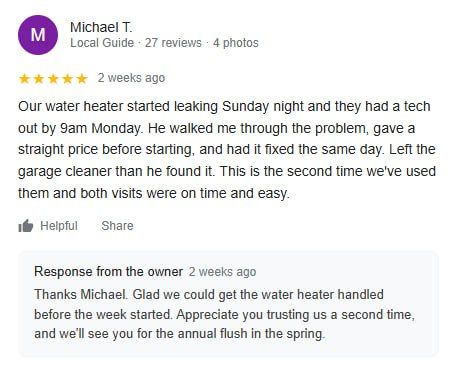
The best reviews usually mention specifics:
- what problem the customer had
- how the business handled it
- whether the team showed up on time
- whether the communication was clear
- whether the customer would hire them again
Responses matter because they show the business is paying attention. The response does not need to sound polished. It should sound like a real person thanking a real customer.
Do not buy reviews or pressure customers into saying things that are not true. The stronger habit is to ask consistently after good work and make the review link easy to find.
Use photos like evidence
Photos can make a profile feel active or abandoned.
For local businesses, photos should help answer the customer’s quiet concerns. Is this a real company? Do they do this kind of work? Does the place look clean? Does the team look professional? Have they done jobs like mine?
Good photos can include:
- finished work
- team members
- storefront or office photos
- service vehicles
- before and after examples, when appropriate
- equipment or process photos
- clean, current interior photos for appointment-based businesses

Stock photos are usually weak here. They may look nice, but they do not prove much. A slightly imperfect real photo can be more useful than a polished image that looks like it came from every other business in the category.
Whole Foods does this well in a different context. Their mochi article works because it does not only explain the product. It shows the product, names flavors, gives availability context, and answers the obvious buying question: where can I get it? The SEO works because the page satisfies curiosity and purchase intent at the same time.
A Google Business Profile should do the local version of that. Show what the customer came to verify.
Connect the profile to a useful website
Some customers will call straight from Google. Others will click through first.
That click is a trust test.
The website should confirm what the profile promised. If the profile says roof repair, the website should have a clear roof repair page. If the profile says emergency plumbing, the website should make it easy to find emergency plumbing information. If the profile lists a service area, the website should support that instead of hiding it.
Google’s SEO Starter Guide recommends clear, accurate page titles that describe what a page is about: https://developers.google.com/search/docs/fundamentals/seo-starter-guide
That sounds basic because it is. Basic is often where local businesses lose.
A page called “Services” is weaker than a page called “Water Heater Repair.” A homepage that says “quality solutions for your needs” is weaker than one that says what the business does, who it helps, and where it works.
The profile gets the customer’s attention. The website should make the next step feel safe.
Watch for the small mistakes that create doubt
Most bad profiles are not obviously terrible. They are just incomplete enough to make a customer hesitate.
Common issues include:
- outdated hours
- weak or missing services
- the wrong primary category
- old photos
- few recent reviews
- no review responses
- inconsistent phone numbers or addresses across the web
- a website that does not match the profile
- a business description that says a lot without saying anything specific
- fake city pages or service areas that do not reflect where the business actually works
One of these problems may not matter much. Several together start to tell a story: this business may not be the best choice.
That story might be unfair. The business may do great work. But the customer can only judge what they see.
A simple profile audit
Open your Google Business Profile and look at it like a customer who has never heard of you.
Ask these questions:
- Would I know what this business does within a few seconds?
- Would I know whether they serve my area?
- Do the reviews make the business feel trustworthy?
- Are there recent photos that prove the business is active?
- Is the phone number easy to find?
- Do the hours look current?
- Does the website confirm the same services listed on the profile?
- Is there any detail that would make me pause before calling?
That last question is usually where the useful work starts.
A good Google Business Profile is not the flashiest one. It is the one that removes doubt at the moment the customer is ready to choose.